Berserk for AIOps & FinOps
See what your agents did, and what it cost.
Open any agent session to follow its prompts, model calls and tool results, with the tokens and cost of every step. Then look across every team and model to see where your AI spend actually goes.
From session to span
Move from the session list to a single step, then open its trace when you need span-level detail.
- Berserk
01 · Sessions
Every step of every session
Each agent session as a trajectory: user turns, model calls and tool calls in order, over a timeline of where the time went. Filter for a tool, an error or a command.

- Berserk
02 · Steps
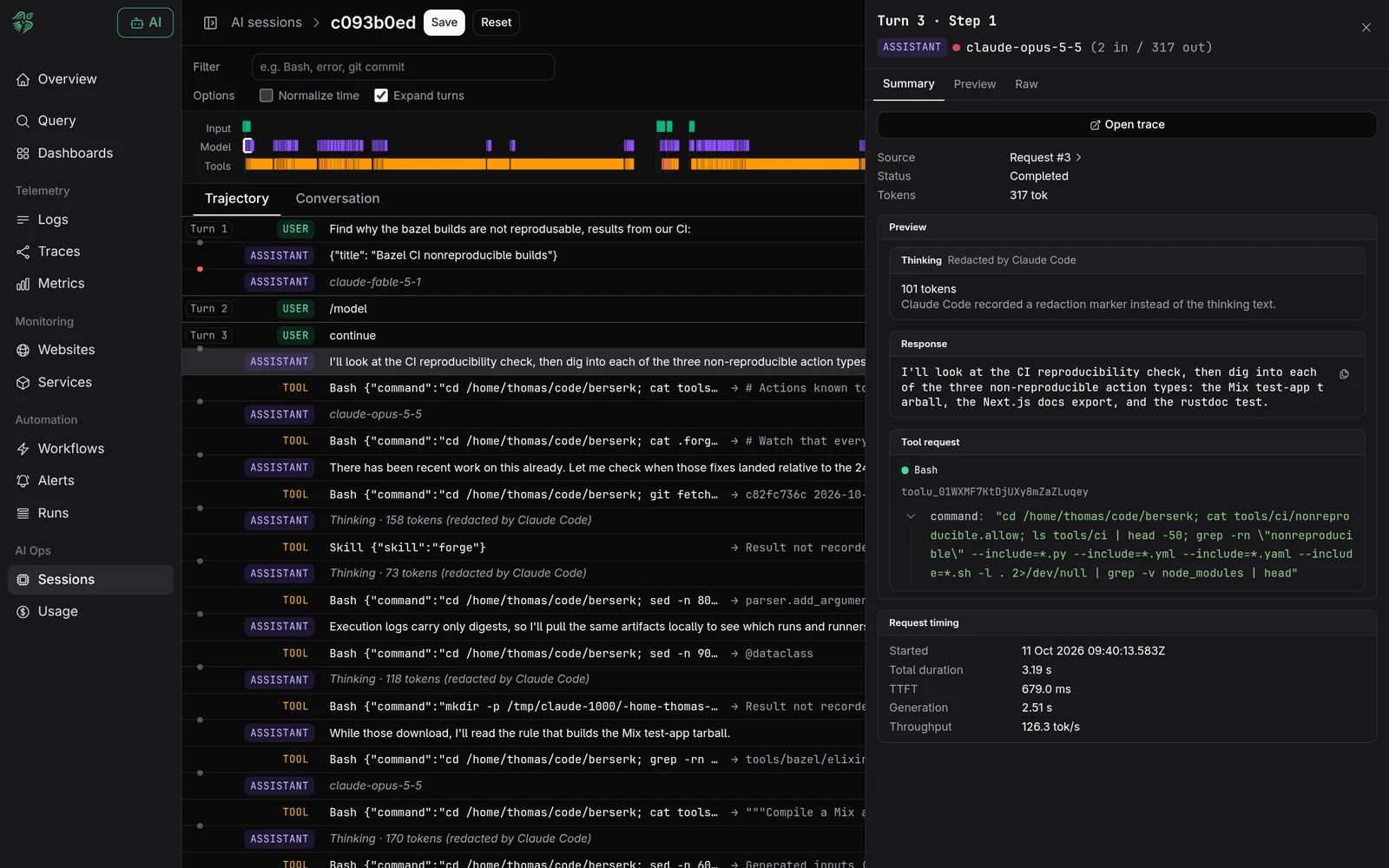
Open any step
See the model, tokens in and out, the response and the exact tool request, with time to first token, generation time and throughput.
- Berserk
03 · Traces
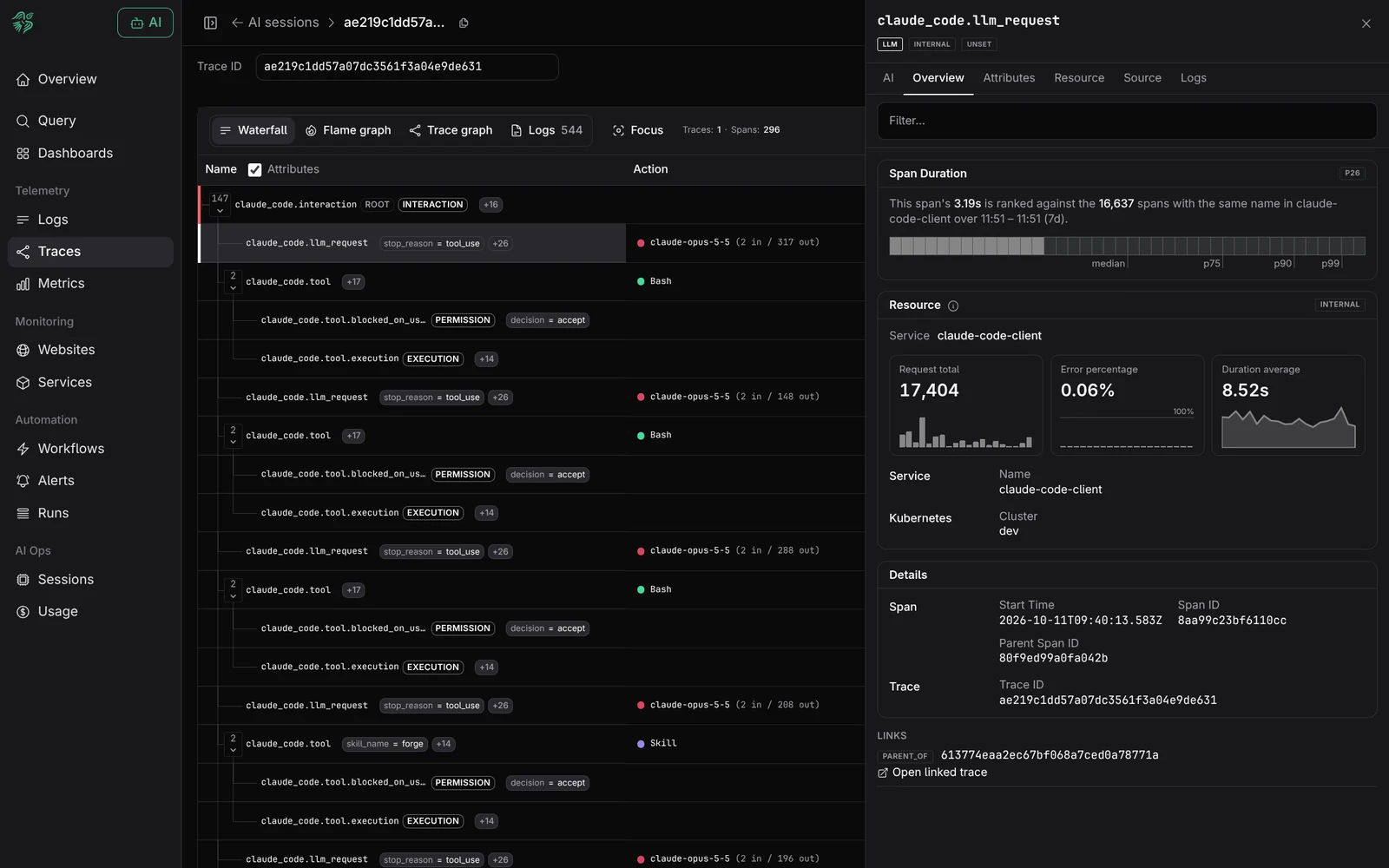
Down to the span
Every turn is an OpenTelemetry trace. Open it to see model and tool calls as spans, rank a call against thousands like it, and follow links into the rest of your traces.
- Berserk
04 · Spend
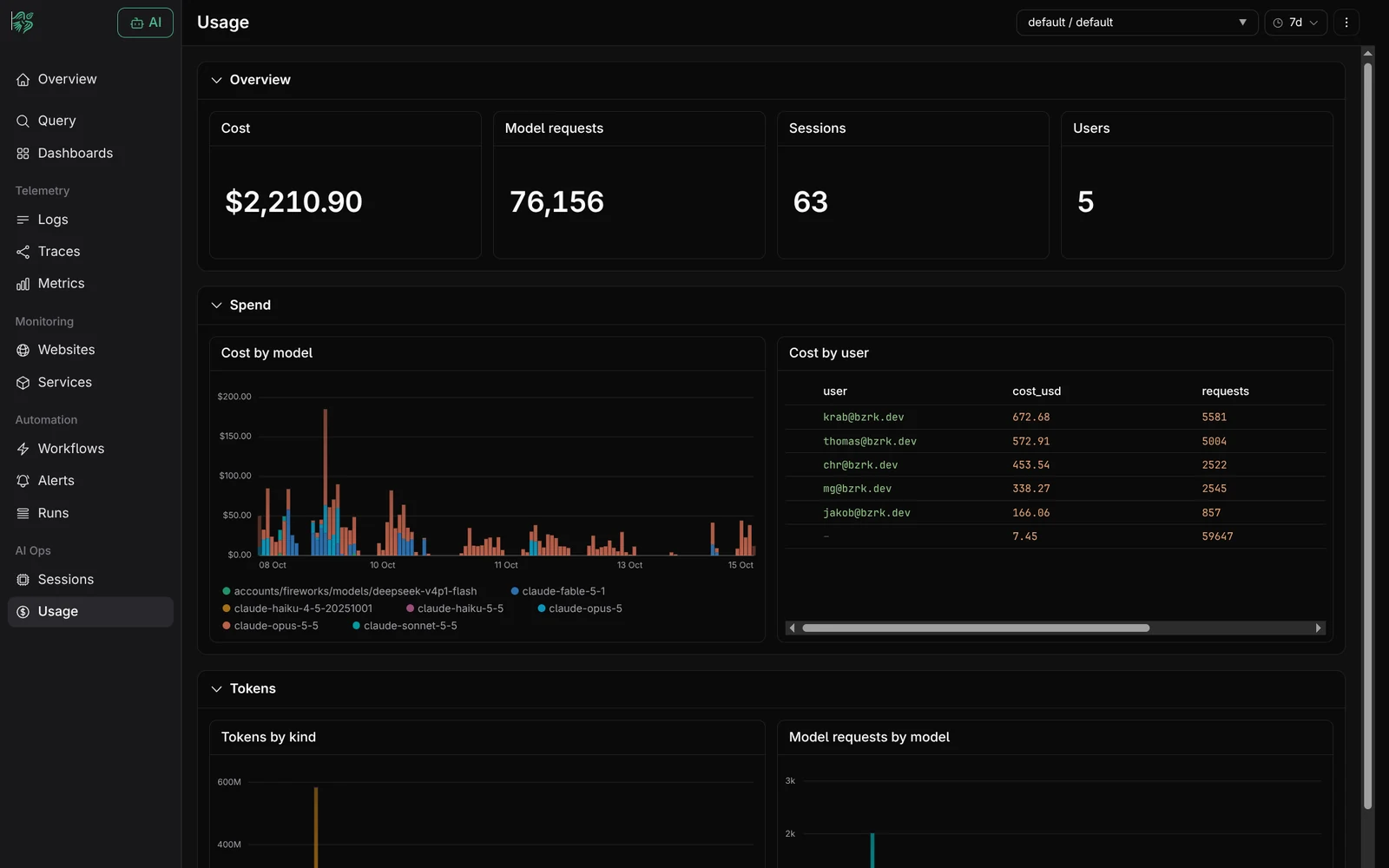
See where the money goes
Cost by model and by user, tokens by kind and failed tool calls, ready out of the box and built from data you can query yourself.
Not just one run at a time
Query agent activity across millions of runs to find repeated failures, shifts in token use and the prompts behind a particular outcome, and join it with your application logs, metrics and traces. With vector and free-text search, prompts and responses stop being text blobs and become something you can mine.
Know who drives the bill
Cost by team, user, model and session, down to the one run that burned through a budget.
Catch waste early
Retry loops, failed tool calls and bloated context show up as cost you can open and fix.
Charge it back
Split AI spend by team, feature or customer, from the same data you debug with.
Shadow AI is already running
Teams ship agents into production every week, and engineers wire up their own. Prompts no one reviewed, tool calls no one logged, decisions no one can replay.
You can't secure, audit or trust what you can't see. A recorded session shows what an agent was asked to do, and what it did next.
Agent behaviour has more inputs
Code and configuration still matter. For an agent, the prompt, the available tools and the context also decide what happens on a given run.
- ·Code
- ·Function arguments
- ·Configuration
- ·System prompt
- ·Tool instructions
- ·Context provided
- ·Request parameters
- ·Structured events
- ·Known code paths
- ·Prompts
- ·Retrieved context
- ·Tool results
- ·Named fields and error codes
- ·Recorded fields and conversation text
- ·Different inputs or deployed code
- ·Prompt wording
- ·Model response
- ·Tool output
Record those inputs with every run, and any result can be explained later.
What you need to inspect agent runs
Schemaless ingest
Send agent telemetry over OpenTelemetry without defining every prompt, tool result or new field in advance.
Room to keep the record
Keep every prompt and trace you may need to investigate a run later, not a 10% sample that missed the run that mattered.
Search inside the text
Search recorded prompts and responses to find a particular run, then narrow it down by its fields.
Connect agent and app activity
Follow an agent trace alongside the application traces, logs and metrics produced during the same request.
Ask across the recorded runs
Use the session view for one conversation, and KQL when the question spans thousands.
Find related prompts
Search recorded text to find runs that mention the same task, error or instruction.
Query changing fields
Combine text and fields in KQL, even when different agents or versions emit different attributes.
Results as they arrive
Recency-first, streaming results, so you, or your agent, act on the signal without waiting for the full scan.
Case study
Governance you can prove
Berserk is working with Ethira to bring full back-testability and evidence gathering to Ethira's AI Agent Governance offering. Ethira maps and enforces what every agent can reach. Berserk keeps a durable, queryable record of what they did, including prompts, tool calls and decisions, so policies can be back-tested against history and every governance call is backed by evidence.
ethira.devGetting started is trivial
Claude Code already emits OpenTelemetry. Turn on its traces, point them at Berserk, and every session shows up in the sessions view. Telemetry from other agents and harnesses lands in the same store, ready to query in KQL. Nothing to model first, nothing to migrate when your agent stack changes next week, and no AI credits to buy from us: bring your own agents and models.