Berserk for Frontier Labs
Every layer of your AI stack, in one place.
GPU metrics, training logs, inference traces and agent sessions in one store, so a question that starts with an agent can end at the GPU that served it.
Built for petabyte scale on object storage and priced on what you send.
Find what wastes GPU time
Find where allocated GPUs stop doing useful work. Compare training logs, GPU metrics and storage events to separate the cause from the timeouts.
- Berserk
01 · Goodput
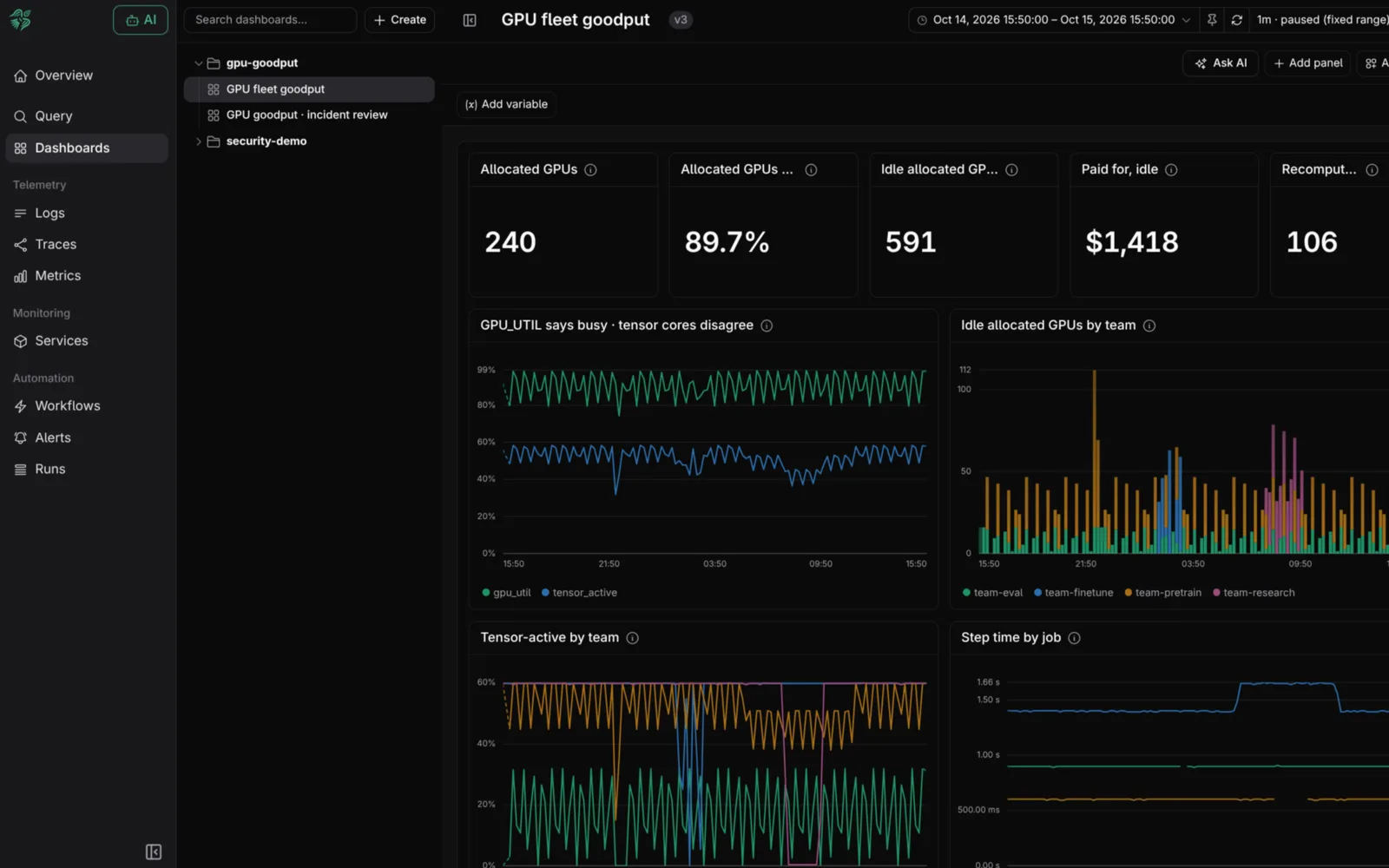
Busy, but not making progress
GPU_UTIL can read 100% while a hung collective spins. Compare it with tensor-core activity, step time and throughput to find GPUs that are busy while the job goes nowhere.
- Berserk
02 · Attribution
127 ranks timed out. One never joined.
Search PyTorch and NCCL logs across every rank and compare the last collective each one recorded. The rank that fell behind leads you to its last log line, and the storage target it was waiting on.
- Berserk
03 · Stragglers
No errors, just slower
A synchronous job runs at the pace of its slowest GPU. Compare step times across ranks, then check temperatures and clocks to find the card that is throttling.
- Berserk
04 · Data & storage
The shard that stalled the run
Data-loader, storage and kernel logs sit on the same timeline as your training logs, so you can see what happened before the restart: a degraded disk, a slow shard, an Xid.
Every layer, in one store
No silos: DCGM metrics, PyTorch and NCCL logs, inference traces and agent sessions side by side, so you see the whole picture, not one tool's slice of it.
06 · GPUs & infrastructure
DCGM metrics, Xid errors, InfiniBand counters and node health. Kubernetes state and events arrive through the OpenTelemetry collector.
05 · Training
PyTorch training logs, NCCL watchdog logs, step time, throughput, MFU, checkpoints and restarts.
04 · Data
Shard fetches, storage latency and data-loader stalls.
03 · Inference
Model-server traces, latency, tokens per request and queue depth.
02 · Tools
Traces, logs and metrics from the applications your agents call.
01 · Agents
Recorded sessions, prompts, model and tool calls, tokens and cost.
Investigate inference across the stack
Compare request latency and queue depth with model-server logs and GPU metrics from the same period.
Send telemetry over OpenTelemetry without defining a schema first, and query new fields alongside the rest of your stack.
Every agent session, in full
Open a recorded session to inspect prompts, model calls, tool calls, tokens and cost. Query across runs to find repeated failures or rising spend.
Berserk for AIOps & FinOpsYour agents query it too
Give your agents access through MCP or the CLI. They can query training logs, GPU metrics, inference traces and agent sessions, with results streaming as the scan runs.
Self-hosted or in a sovereign cloud
Run Berserk on your own infrastructure or in a sovereign cloud, using any S3-compatible storage. Your telemetry stays inside the environment you control.
Keep the evidence you need
Keep the job context
Query by rank, node, GPU, job and step.
Keep every rank's logs
Search across ranks to compare what happened before a failure.
Old data, same query
No hot and cold tiers. Search older telemetry the same way you search today's.